The Useful Answer
Most “best free invoice generator” lists make the same mistake: they rank anything with an invoice page as if it solves the same job.
It does not.
Sometimes you need one clean PDF and you do not want an account. Sometimes you need recurring invoices, payment reminders, and a client portal. Sometimes the invoice is mainly a payment link. Those are different problems, and pretending they are the same is how people end up signing up for software when they only needed a PDF.
We checked 20 options for 2026: Belvak, Zoho Invoice, Wave, Square Invoices, Invoice Ninja, Invoice Generator, PayPal Invoicing, QuickBooks Invoice Generator, FreshBooks Invoice Generator, Canva, Adobe Express, Invoice Simple, Invoice Home, Refrens, Invoicely, Jotform, Bookipi, Hiveage, Skynova, and Billdu.
Here is the ranking I would actually give someone who needs to make a decision:
- Belvak Free Invoice Generator: best free PDF invoice generator overall.
- Zoho Invoice: best free full invoicing system.
- Wave: best free invoicing when accounting matters.
- Square Invoices: best free invoice tool for collecting payment.
- Invoice Ninja: best free option for power users and self-hosting-minded teams.
- Invoice Generator: best plain invoice maker when speed matters more than design.
Belvak is first because it solves the core job without making the user pay in time, branding, or personal information: open the page, build a professional invoice, customize it, download the PDF, and leave.
What We Actually Looked At
The big question was not “how many features are on the pricing page?” It was simpler:
- Can a real person create a useful invoice for free?
- Is there a watermark or branding penalty?
- Do you have to create an account before seeing the value?
- Does the PDF look professional enough to send to a client?
- Can you edit the parts that matter: logo, colors, line items, tax, discounts, payment terms, and footer?
- Is the free plan genuinely useful, or is it a trial dressed up as free?
- Does the tool fit the job it claims to do?
That last point matters. Zoho and Wave are better than Belvak if what you want is a long-term invoicing account. Square is better if payments are the center of the workflow. Canva is better if you are designing a one-off branded document and do not care about invoicing logic. But if the job is “make me a polished invoice PDF right now,” Belvak is the cleanest choice.
1. Belvak Free Invoice Generator
Belvak Free Invoice Generator wins because it respects the invoice as a document, not just a form submission.
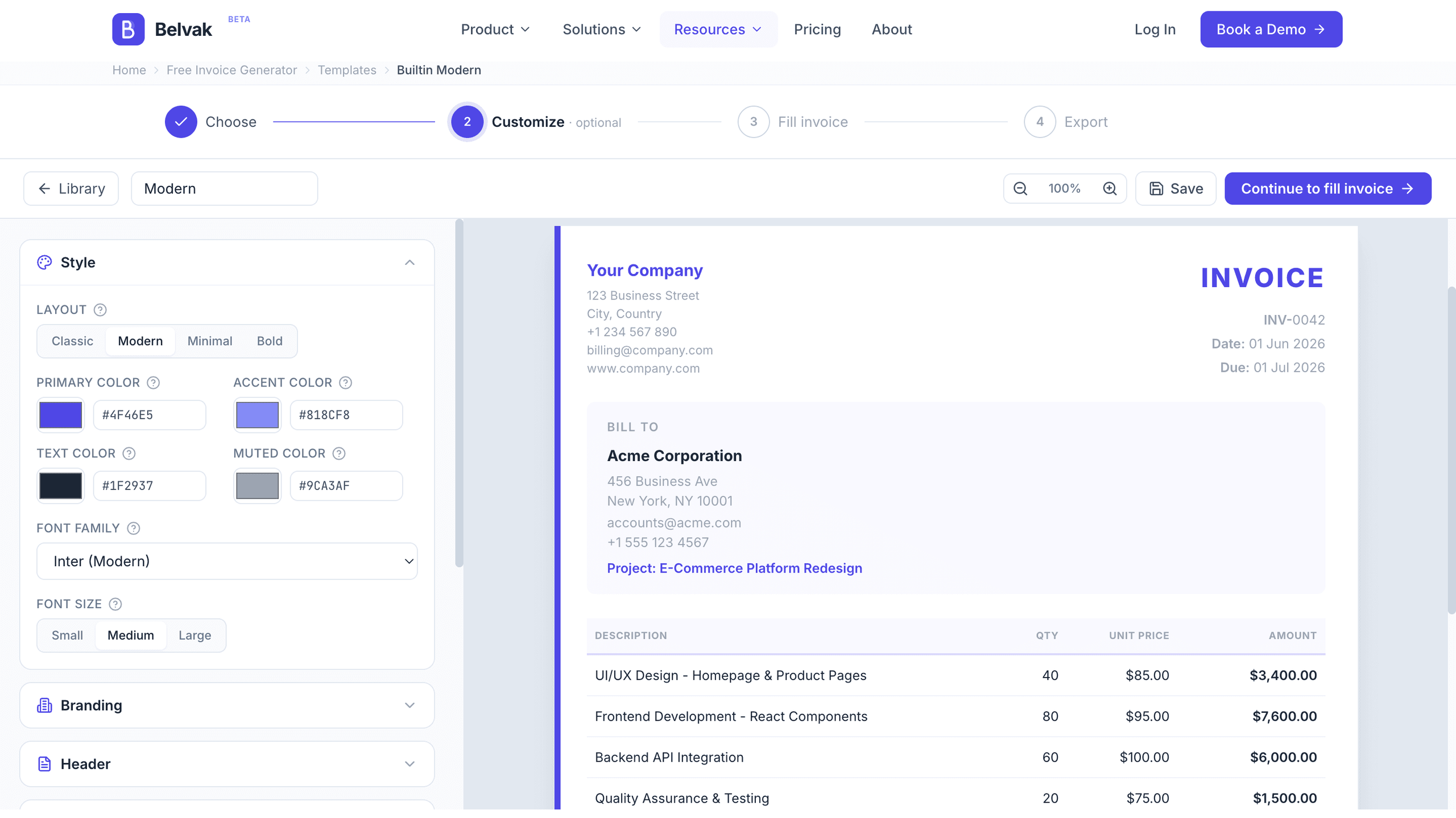
You start with 12 templates: Classic, Modern, Minimal, Bold, Corporate, Executive, Creative, Professional, Retail, Contractor, Tech, and Elegant. That range matters more than it sounds. A contractor invoice should not look like a design-studio invoice. A consultant may want something quiet and formal. A small retail business may want the invoice to feel more like a receipt. Belvak gives you enough variety without dumping you into a giant template marketplace.
The editor is the part that feels different. You can click directly into the invoice preview and change the business name, client details, line items, notes, and terms where they appear. Totals, tax, and discounts update as you work. You can upload a logo, adjust colors and fonts, change visible sections, edit columns, add a watermark or stamp, and still end with a clean A4 PDF.
The free part is also actually free: no signup, no email gate, no watermark.
That combination is rare. A lot of tools give you speed but not polish. Others give you polish but ask you to sign up, accept their branding, or work through a full invoicing app. Belvak lands in the useful middle. It is quick enough for one invoice and serious enough for a business that cares how its paperwork looks.
Where Belvak is not the best choice: it does not send the invoice for you, collect card payments, or manage recurring invoices inside the free generator. That is a reasonable boundary. The free tool is a PDF generator. The full Belvak app is where payment tracking, clients, projects, recurring billing, and proposal-to-invoice workflows belong.
Use Belvak when you want the invoice itself to look good and you do not want to make an account just to download it.
2. Zoho Invoice
Zoho Invoice is not just an invoice generator. It is a full invoicing product that happens to be free.
That makes it a very strong second-place pick. Zoho includes invoices, credit notes, payment reminders, online and offline payment options, quotes, recurring invoices, expenses, time tracking, projects, a customer portal, reports, and integrations. If you invoice clients every week and want to know what is paid, overdue, recurring, or attached to a project, Zoho is much more useful than a one-page PDF maker.
The reason it does not beat Belvak here is friction. Zoho asks you to enter the world of Zoho. That is fine if you want software. It is too much if you need a PDF before sending an email in five minutes.
The honest comparison is this: Belvak is better for creating a polished invoice document quickly. Zoho is better for running an ongoing invoicing process.
3. Wave
Wave belongs high on the list because it connects invoicing with basic accounting. Its free Starter plan includes basic accounting and invoicing features, and Wave sells add-ons for online payments, receipt scanning, payroll, and more advanced accounting needs.
That is useful for a small business that wants its invoices to live near its books. You are not just downloading a PDF and hoping you remember what happened later. You are keeping the invoice inside a financial system.
The tradeoff is design and immediacy. Wave is not where I would go if I wanted the invoice to look especially tailored. It is also account-based software, so the first invoice takes more setup than a pure generator.
Wave is a good choice when the invoice is part of bookkeeping. It is not the fastest or most flexible choice for a one-off branded PDF.
4. Square Invoices
Square Invoices is payment-first, and that is its strength.
Square Free has no monthly subscription cost; you pay processing fees when customers pay. You get invoices, recurring invoices, deposits, payment reminders, and flexible payment options inside the Square ecosystem.
If you already use Square for POS, appointments, retail, or in-person payments, this is probably the most natural option on the list. Your invoice is not just a document. It is a way to get paid.
But the invoice design is not the star. Square invoices look professional enough, but they are not built for deep visual customization. If your priority is a clean client payment flow, Square makes sense. If your priority is a beautiful PDF with your own style, Belvak is better.
5. Invoice Ninja
Invoice Ninja is the tool I would show to someone who says, “I want free invoicing, but I also want control.”
The free plan allows up to 5 clients with unlimited invoicing. It includes invoice templates, logo branding, online payments, recurring invoices, expenses, projects, time tracking, tax settings, a client portal, and PDF creation. Invoice Ninja also has an open-source and self-hosting story, which makes it more interesting than most free invoicing products.
The limits are real, though. Five clients is enough for a freelancer with a small roster, not enough for many agencies or service businesses. Free client-facing pages also keep Invoice Ninja branding unless you upgrade.
I would not recommend Invoice Ninja to someone who only needs a fast PDF. I would recommend it to a technical freelancer, a small consultancy, or a business owner who likes configuring systems and wants room to grow.
6. Invoice Generator
Invoice Generator is the classic fast option. It says it is trusted by more than 4 million businesses, and the appeal is obvious once you use it: the page is direct, familiar, and hard to misunderstand.
You add business details, client details, line items, currency, tax, discount, shipping, and download the invoice. It is not trying to be your accounting system. It is not trying to win a design award. It is a straightforward invoice template in the browser.
That is useful. Sometimes simple is exactly right.
It ranks below Belvak because the finished invoice and customization options feel more generic. Belvak gives you more template choice, more brand control, and a better editing experience without adding signup friction. Invoice Generator is faster for the plainest invoice. Belvak is better for a client-ready invoice that should feel intentional.
The Other 14 We Checked
These did not make the top six, but several are still good tools. They just serve narrower jobs, have stricter limits, or make more sense as part of a paid workflow.
PayPal Invoicing
PayPal Invoicing is free to create and send. You pay PayPal’s transaction fee when a client pays. It supports payment links, recurring invoices, logo customization, and international invoicing in many markets and currencies.
The reason it misses the top six is that PayPal becomes the center of the experience. That is great when the client wants to pay through PayPal. It is less ideal when you want a neutral PDF invoice that you own and send however you like.
QuickBooks Invoice Generator
QuickBooks Invoice Generator is useful and surprisingly modern. It can create and download an invoice for free, and Intuit AI can help turn notes or a website into business details, line items, logo, and brand colors.
The catch is the surrounding QuickBooks gravity. The generator is free, but the page naturally points you toward QuickBooks Payments and QuickBooks plans. That is not bad. It is just not as clean as a dedicated no-signup generator.
FreshBooks Invoice Generator
FreshBooks Invoice Generator is a polished free tool from a known accounting brand. It works well for basic invoices and makes sense if you already like FreshBooks or might move into its paid accounting product later.
It does not stand out enough as a free generator to beat Belvak, and it is not as complete a free invoicing system as Zoho, Wave, or Invoice Ninja.
Canva
Canva is excellent at making an invoice look designed. You get designer templates, drag-and-drop editing, logo uploads, color control, font choices, and PDF download.
The issue is that Canva is a design tool, not an invoicing tool. It will help you make a beautiful document, but it will not think like billing software. Invoice numbering, payment status, recurring invoices, tax logic, and client payment workflows are not the point.
Use Canva when the invoice is more of a branded document than an operational record.
Adobe Express
Adobe Express sits in the same category as Canva. It has free invoice templates, brand customization, no credit card requirement, and Adobe’s design and AI tooling around it.
It is a good choice if you already work in Adobe Express. It is not the best choice if you want invoice math, payment tracking, or a fast no-account PDF workflow.
Invoice Simple
Invoice Simple is a mature invoice app with logo support, tax, discount, currency, PDF, email, estimates, expenses, clients, items, and reports.
It feels practical, especially for people who want a mobile-friendly app-style workflow. It did not make the top six because the free generator experience is not as compelling as Belvak for no-signup PDFs, and the broader app competes more with full invoicing systems.
Invoice Home
Invoice Home has one obvious strength: templates. It offers more than 100 invoice template designs, plus email sending, PayPal or card payment options, account saving, and PDF download.
That is a good fit if template variety is your main concern. The editor itself feels less modern than Belvak, and the account/payment flow is not as clean for people who want a simple private PDF.
Refrens
Refrens is closer to a business suite than a lightweight generator. It supports invoices, quotations, recurring invoices, expenses, and saved documents.
The free cap is the concern. Its FAQ says the online invoicing software is free for 15 documents a year, and another FAQ line mentions 20 documents. Either way, you should check the current limit before building a workflow around it.
Invoicely
Invoicely offers online payments, time tracking, expenses, mileage, reports, and mobile invoicing. It is more of an invoicing platform than a PDF maker.
It is worth considering if you want a dashboard around invoicing. It is not the strongest choice for someone who wants to generate a polished invoice without signing up.
Jotform
Jotform Invoice Generator is useful when the invoice begins with a form. You can build an order form, collect customer details, turn submissions into PDF invoices, embed the form, and track invoices and payments.
That is a real use case. It is just not the normal “I need to send an invoice now” use case.
Bookipi
Bookipi is strong on mobile invoicing. It includes invoice customization, card payments, logo support, PDF saving, recurring invoices, reminders, signatures, and web-mobile syncing.
The free plan allows up to 3 invoices per month. That is fine for someone who invoices occasionally from a phone. It is too tight for regular billing.
Hiveage
Hiveage has a useful free plan: 5 clients, unlimited invoices, unlimited estimates, time tracking, expense tracking, and payment gateways.
That is generous if you have a tiny client list. The client cap is the reason it stays out of the top six. Once you pass 5 clients, you are choosing a paid invoicing system rather than a free one.
Skynova
Skynova offers a classic invoice template with purchase order numbers, sales taxes, logo support, PDF download, printing, online sending, view notifications, and online card payment.
It is practical and businesslike. It did not rank higher because the design and editing experience feels more traditional than the best free generators in 2026.
Billdu
Billdu is a polished invoice maker with mobile apps, reminders, invoice tracking, expenses, reports, recurring payments, and many template resources.
The full product is trial/paid, with paid plans listed from Lite upward. It may be worth paying for if you want a serious mobile invoicing app, but it is not one of the best genuinely free options.
The Quick Choice
If you want one clean PDF invoice today, use Belvak.
If you want a free invoicing account, use Zoho Invoice.
If you want invoices tied to basic accounting, use Wave.
If payment collection is the whole point, use Square.
If you want a configurable invoicing system and can live with a 5-client limit, use Invoice Ninja.
If you want the fastest plain invoice template, use Invoice Generator.
If design matters more than invoice management, use Canva or Adobe Express.
If invoices should be created from form submissions, use Jotform.
If you only send a few invoices from your phone, Bookipi is worth a look.
Final Call
The best free invoice generator in 2026 is Belvak Free Invoice Generator.
Not because every other tool is weak. Zoho, Wave, Square, and Invoice Ninja are all better at certain workflows. But the phrase “free invoice generator” usually means something very specific: I need a professional invoice, I need it now, and I do not want to sign up just to download a PDF.
For that job, Belvak is the best answer.